Facebook & Instagram Ads, built right inside Mojo
You already have something most advertisers would pay for: lists of homeowners, leads and past clients you know by name. Now you can turn any Mojo calling list or group into a Facebook and Instagram audience and run ads to it, without exporting a single CSV.
- No extra Mojo cost
- Runs in your own ad account
- Results tracked in Mojo

Custom audience · updates every hour
Talk to your audiences, not everyone on Facebook
Start from the data you already work every day in Mojo, instead of a broad audience that has never heard of you.
Your data, your audience
Pick one calling list or group, including lists you built from Neighborhood Search, Expired or FSBO data. Facebook matches it to people on Facebook and Instagram.
An ad in minutes, with AI help
Write the ad message and create the image with Mojo AI, or upload your own photo or video. Preview it as a Feed post, Story or Reel before you submit.
No extra Mojo cost
Included with Agent Access. You choose the daily budget, starting at $1 a day, and Meta bills your ad account directly.
From Mojo list to live ad in four steps
Connect Facebook once
Sign in with Facebook and pick your Business, Ad Account and Page. Instagram is optional.
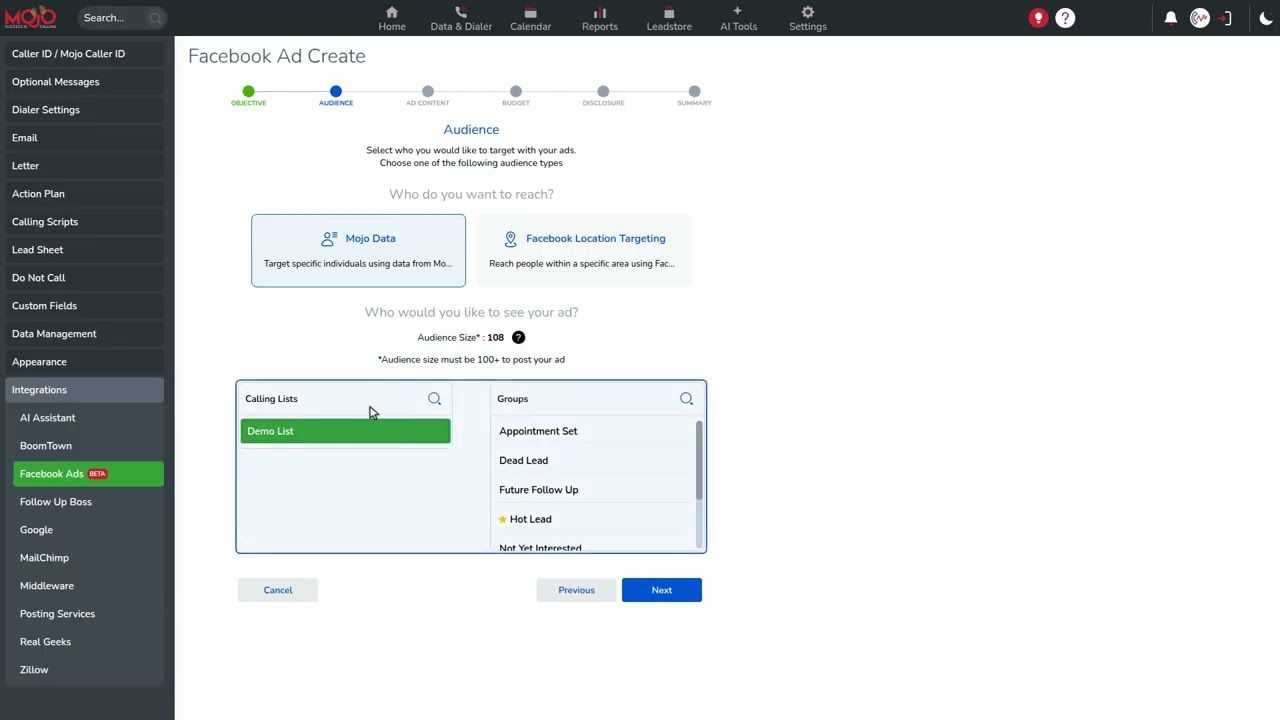
Choose your audience
Use a Mojo calling list or group, or reach people around an area on the map.
Create the ad
Add your image or video and message, or let Mojo AI draft them. Choose Facebook, Instagram or both.
Set a budget and launch
Pick dates and a daily budget. After Meta reviews the ad, follow impressions, clicks and spend in Mojo.
Reach the people on your lists
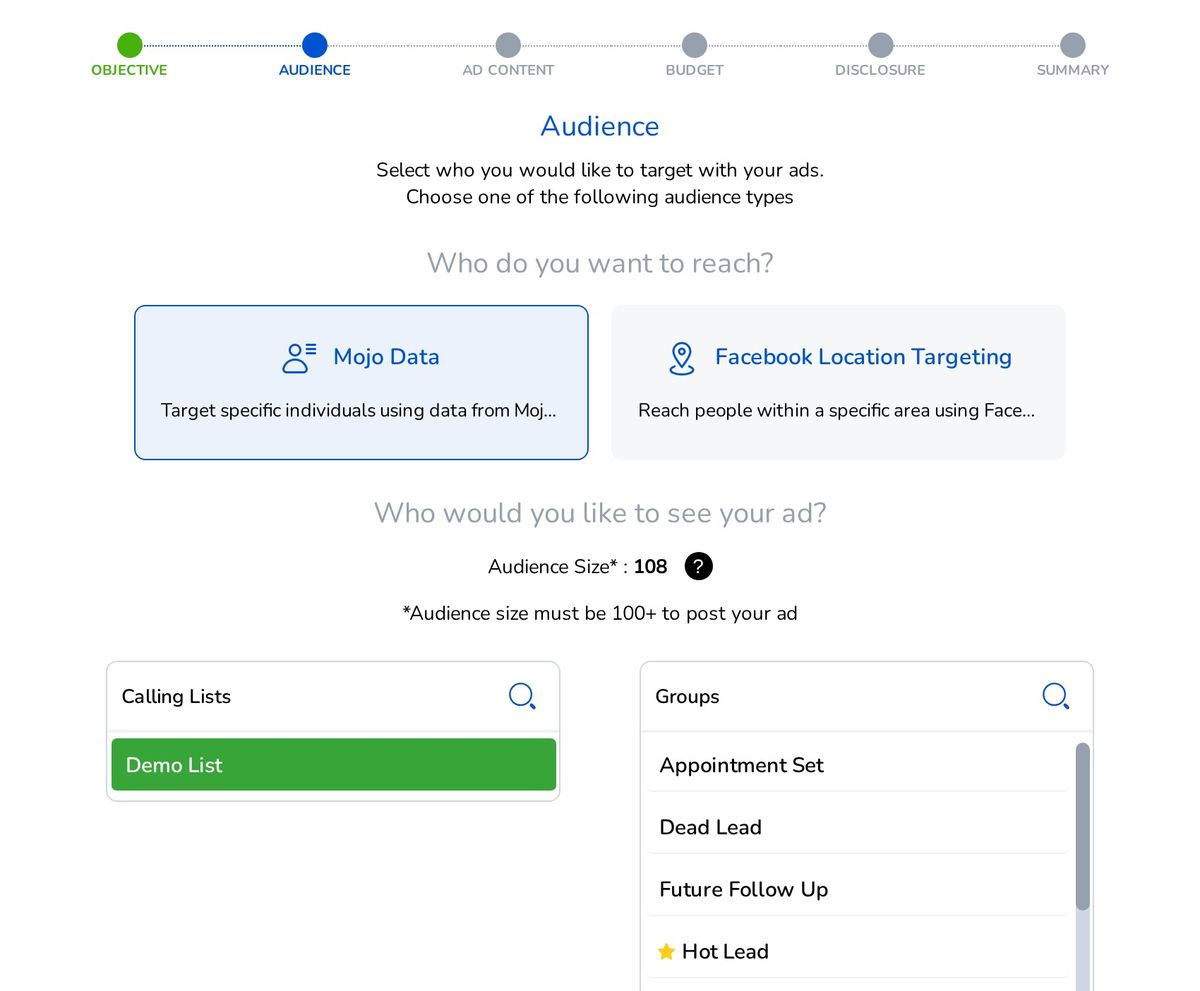
Choose Mojo Data to use one of your calling lists or groups as the audience, or Facebook Location Targeting to reach people within a chosen area on the map.
While your ad is active, Mojo keeps the audience in step with your list every hour, so new contacts are added and removed contacts drop off. Contact details are sent to Facebook in hashed form, never as a file.
- One list or one group per audience
- Audience size shown before you post (100+ needed)
- Ads labeled "Mojo Ad Builder" in Facebook Ads Manager
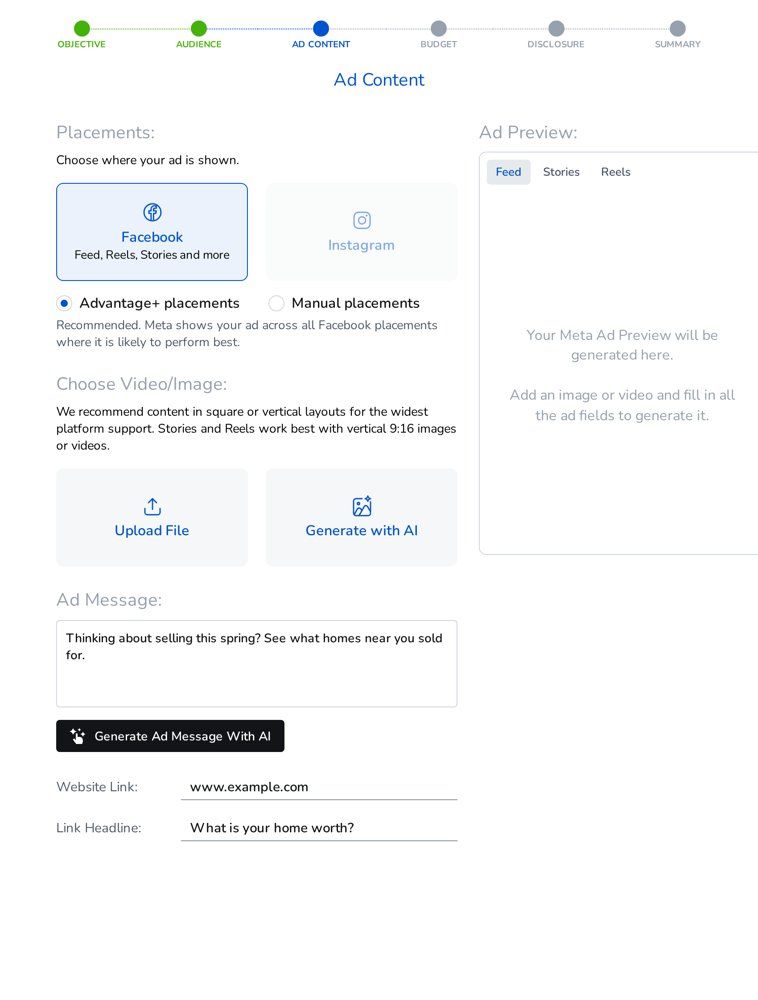
Create the ad and preview it everywhere
Facebook placement is always on. Turn on Instagram for any ad, and let Meta choose the best placements or pick Feed, Stories and Reels yourself.
Stuck on wording? Generate Ad Message With AI drafts the copy, and Generate with AI creates an image for you.
- Facebook and Instagram from one ad
- Feed, Stories and Reels previews
- AI ad message and image
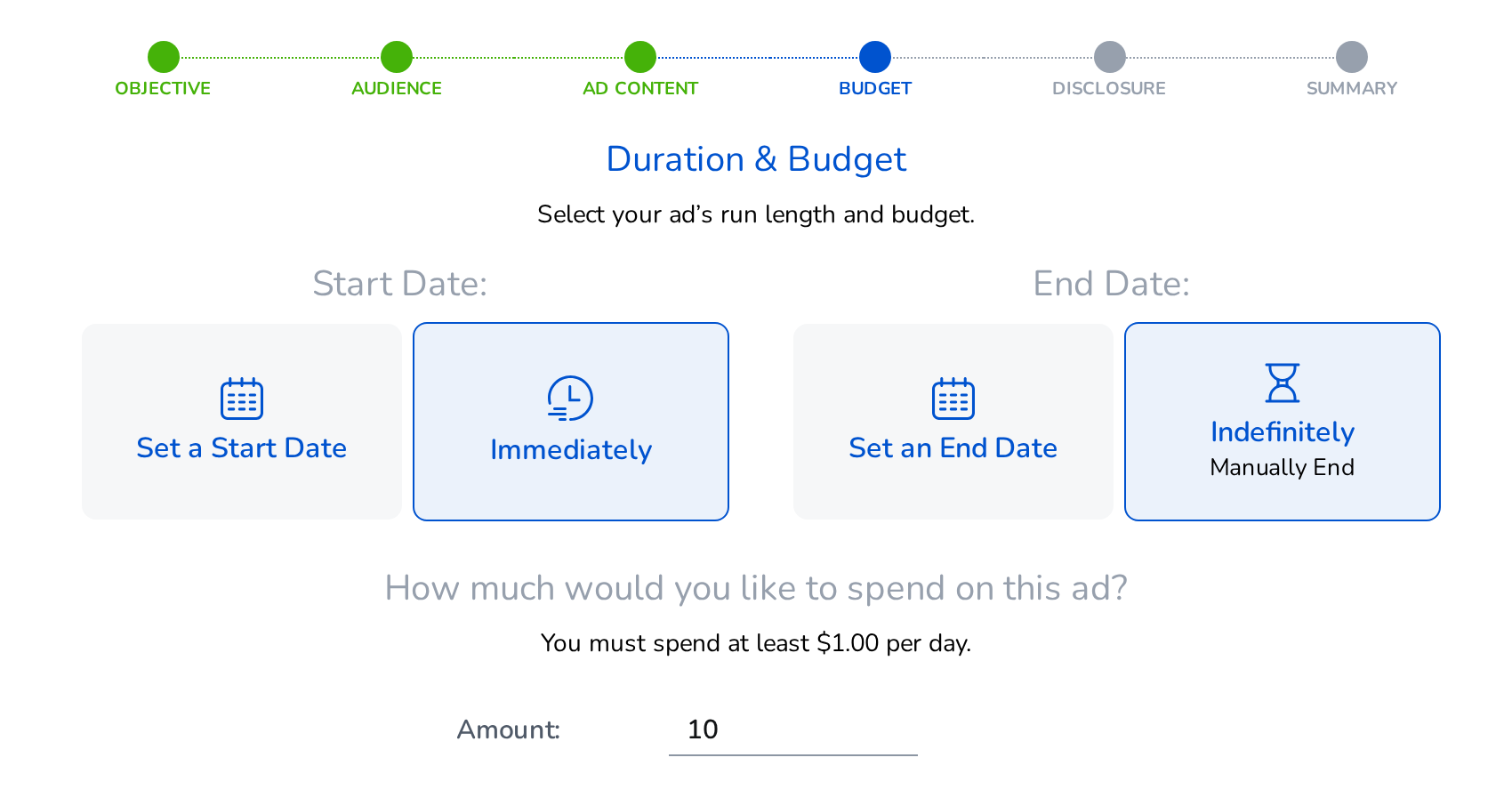
Set your budget. Watch your results.
Start right away or on a date, and run until a date or until you stop it. You decide the daily amount, from $1 a day.
Your ads list shows impressions, link clicks and spend for the last 7 days, with statuses like Pending review, Active and Paused. Pause an ad, change its budget or end date, or duplicate it any time.
- Daily budget from $1
- Impressions, link clicks and spend in Mojo
- Pause, adjust the budget or duplicate
Put the data you already have to work
Stay in front of homeowners you are calling
Run a "what went wrong last time" ad to the Expired list you dial every morning.
Just Listed and Just Sold
Show a new listing or recent sale to people around it with Location Targeting.
Keep your sphere warm
Share a market update or home-value offer with your past-client group.
Offer help on their terms
Invite FSBO sellers to a pricing guide or open-house checklist.
Watch the 1:40 walkthrough
Included with Agent Access
Every Mojo user has Agent Access, the Lead Manager license. Facebook & Instagram Ads comes with it, and no dialer license is needed. Mojo charges nothing extra; your ad budget is paid to Meta.
Facebook & Instagram Ads FAQ
Does every contact on my list see the ad?
No. Facebook shows your ad to the people it can match to the contacts in your list or group. An audience needs at least 100 matched people before an ad can run, and Mojo shows you the audience size before you post.
Does Mojo charge for Facebook & Instagram Ads?
No. It is included with Agent Access, including the AI tools. Your ads run in your own Facebook ad account, and Meta bills that account for the budget you set.
What do I need on the Facebook side?
A business portfolio and a Facebook Page created in Meta Business Suite, and an ad account with a payment method. You connect them to Mojo once.
Do I need an Instagram account?
No. Your ads can still run on Instagram using your Facebook Page name and picture. Link a business Instagram account any time to show your own handle.
How soon will my ad run?
Meta reviews every ad before it runs. You can follow the status, such as Pending review or Active, in Mojo.
Is my list uploaded as a file?
No. No CSV is ever exported. Mojo sends contact details to Facebook in hashed form and keeps the audience updated every hour while your ad is active.
Can I use it on the mobile app?
Facebook & Instagram Ads is available in the Mojo web app.
Put your Mojo data to work on Facebook and Instagram
Included with Agent Access. No dialer license needed.

